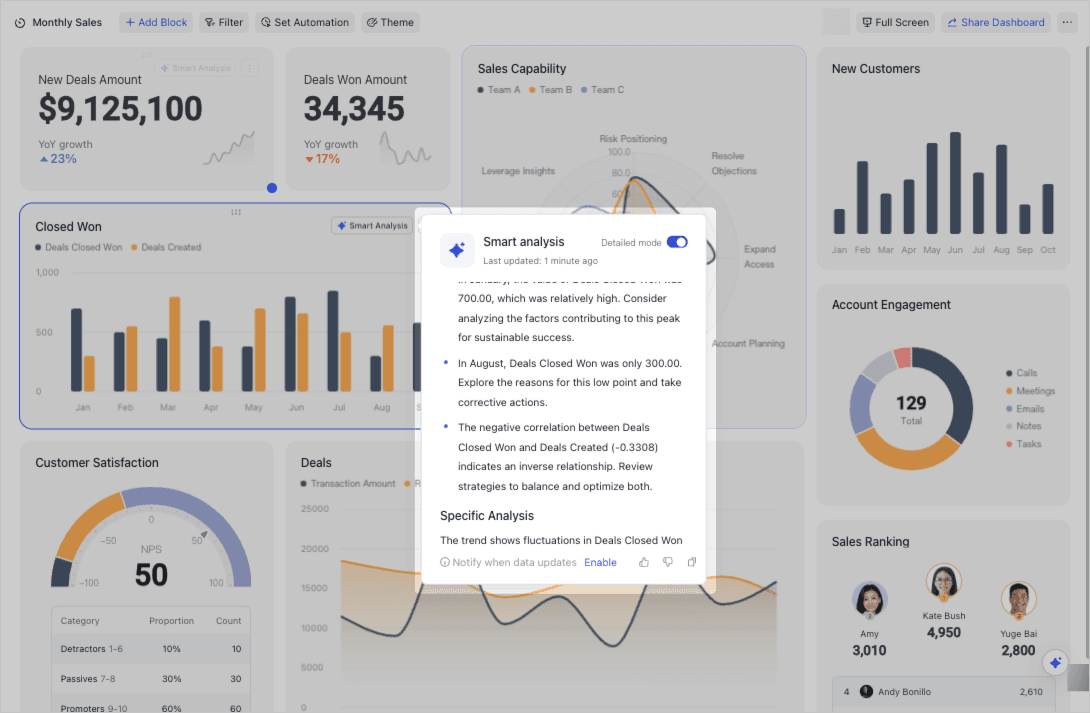
Most dashboards tell you everything except what you actually need to know. They’re a museum of beautiful but eerily quiet artifacts - charts, filters, slicers - that require you to play analyst every time you open them. AI‑summarized dashboards flip that script. Instead of asking humans to interpret raw signals, they produce a concise, defensible narrative: what changed, why it matters, and what to do next. Think of it as the difference between a plane’s instrument cluster and the pilot’s warning chime plus corrective checklist. The gauges are still there; you just don’t need to stare at them all day.
This piece mentors mid‑level engineers who have shipped production systems and know the scar tissue of dashboards that go stale. We’ll cover architecture, modeling patterns, latency/cost, trust and evaluation, and adoption pitfalls. Along the way, we’ll link out to deeper dives on retrieval, vector search, LangChain/LlamaIndex, and practical Next.js integration where relevant. If you’ve ever tried to explain a heatmap to a non‑technical stakeholder only to watch their eyes glaze over, this is for you.
See also: building retrieval pipelines in RAG for SaaS and hands‑on setup in Document Q&A in Next.js with LangChain. For SEO and metadata that improve discoverability of summaries, review Next.js SEO Best Practices.
Why Traditional Dashboards Break Down
Static dashboards assume your questions are fixed. Reality disagrees. As product, growth, and infrastructure evolve, the “correct” slice of data shifts weekly. That’s question drift. Meanwhile metric drift happens because definitions change subtly (new retention windows, backfills, cohort logic). Add in human interpretation variance, and you get a lot of time spent arguing over what a chart means rather than acting on it.
AI‑summarized dashboards focus on decision‑making. They compress many signals into a structured brief that says: “Signups are up 12% WoW due to organic landing page improvements; activation flat; infra cost up 7% driven by longer inference times in APAC; action: roll out cache warmers to APAC, A/B Step 3 of onboarding, and update SEO schema for how‑to pages.” The full charts are still available, but they’re supporting evidence, not the main attraction.
If you’re thinking “that sounds like RAG with some business rules,” you’re right. The summary is an opinionated retrieval and reasoning layer on top of time‑series data, events, and metadata. For background on retrieval building blocks, peek at Vector Databases & Semantic Search and our production patterns in Retrieval‑Augmented Generation: A Practical Guide.
What an AI‑Summarized Dashboard Actually Is
At a high level, the system does three things:
- Retrieve the right data slices and recent events.
- Score, rank, and compress them into a narrative with quantitative backing.
- Output structured recommendations with links to drill‑downs and raw evidence.
In practice, you’ll engineer it like this:
- Data plane: fact tables (metrics), dimension tables (segments), event logs, and feature store snapshots.
- Retrieval: a mix of SQL aggregations for ground truth metrics and semantic retrieval for “context” (release notes, incident reports, tickets).
- Reasoning: an LLM that turns metric deltas into hypotheses and recommendations, bound by guardrails and templates.
- Evidence: canonical links to saved queries/charts to defend claims.
- Evaluations: regression‑style tests on historical periods and adversarial prompts to keep hallucinations in check.
For a pragmatic architecture walkthrough, compare it to recommender patterns in Architecture for AI Recommendation Engines, and for practical integration review OpenAI in Next.js.
System Architecture: The Boring, Durable Path
- Source of truth: Keep SQL as the authoritative foundation for numbers. Even when an LLM is “explaining,” the numbers come from deterministic queries or materialized views. You can decorate results with embeddings for semantic grouping, but never let the model invent numbers.
- Feature store: Precompute daily/weekly aggregates for common slices (WoW, MoM, segment deltas). This makes retrieval fast and cheap.
- Context warehouse: Maintain a corpus of “explainer artifacts” (release notes, PR descriptions, incident postmortems, campaign briefs). Embed them and index in a vector store for semantic joins to the metrics.
- Summarization service: A stateless service (Next.js API route, FastAPI, etc.) that takes a time window, segment(s), and user role, then orchestrates retrieval + LLM reasoning.
- Caching and replay: Cache summaries for windows/segments and keep a replay log (inputs/outputs) for evals and audits.
For a Next.js‑first implementation, see patterns in Integrate OpenAI API in Next.js and framework tradeoffs in LangChain vs. LlamaIndex Workflows.
Reasoning Patterns: From Delta to Narrative
Good summaries are not poetry; they’re structured arguments with citations. A battle‑tested pattern:
- Compute deltas
- Identify significant changes vs. a baseline (WoW, trailing 4‑week mean, anomaly bands).
- Rank by business importance (weighted by revenue impact, customer segment, or SLA tier).
- Hypothesis generation
- Use semantic retrieval to pull likely causes: recent releases, marketing campaigns, incidents, and regional outages.
- Ask the model to propose causal hypotheses, but force it to ground each in at least one piece of evidence (chart link, ticket URL, or PR).
- Recommendation templates
- Convert hypotheses to actions: “If APAC latency > 250ms and cache miss rate increased this week, propose cache prewarming + CDN TTL adjustments.”
- Include expected impact and cost level.
- Output schema
- Require structured output: headline, 3–5 bullet points with metric deltas, 2–3 actions with priority scores, and evidence links.
Here’s a simple TypeScript sketch of the reasoning orchestrator you might drop into a Next.js API route:
import OpenAI from "openai";

type MetricDelta = {
  name: string;
  current: number;
  previous: number;
  deltaPct: number;
  evidenceUrl: string;
};

type RetrievedContext = {
  title: string;
  snippet: string;
  url: string;
};

type SummaryOutput = {
  headline: string;
  highlights: Array<{ statement: string; evidenceUrl: string }>;
  actions: Array<{ recommendation: string; priority: number; evidenceUrls: string[] }>;
};

const SYSTEM_PROMPT = `
You are an analytics advisor. Produce grounded, concise summaries for mid-level engineers.
- Never invent numbers; use only provided metrics.
- Prefer clear, testable actions over generic advice.
- Cite evidence with provided URLs.
Output JSON only, matching the schema.
`;

export const summarizeMetrics = async ({
  metrics,
  context,
  openai,
}: {
  metrics: MetricDelta[];
  context: RetrievedContext[];
  openai: OpenAI;
}): Promise<SummaryOutput> => {
  const userContent = JSON.stringify({ metrics, context });

  const response = await openai.chat.completions.create({
    model: "gpt-4o-mini",
    temperature: 0.2,
    response_format: { type: "json_object" },
    messages: [
      { role: "system", content: SYSTEM_PROMPT },
      { role: "user", content: userContent },
    ],
  });

  const json = response.choices[0]?.message?.content ?? "{}";
  return JSON.parse(json) as SummaryOutput;
};
The important part isn’t which model you pick but that you constrain outputs, keep numbers deterministic, and preserve links to evidence. If your summary can’t be reverse‑engineered from its citations, it’s a vibe, not analytics. For a deeper grounding workflow, see RAG for SaaS and LangChain vs. LlamaIndex.
Latency, Cost, and Caching
“Won’t this be expensive and slow?” Not if you design for it:
- Precompute the expensive bits: daily aggregates, top deltas, anomaly flags. Store them in a compact row per segment/window.
- Keep summaries short: the difference between 300 tokens and 2000 tokens adds up across orgs and refreshes.
- Cache by window and role: a PM and a backend lead need different summaries, but both can be cached for 15–60 minutes.
- Use small, fast models first: a “candidate summary” from a lighter model can be re‑ranked or polished by a stronger model if needed.
- Streaming UI: render the headline and first bullet as soon as they arrive; the rest can follow. This keeps UX snappy. See our streaming patterns in Integrate OpenAI into Next.js.
For infra parallels and automation considerations, skim AI in DevOps Automation: What’s Next.
Guardrails and Trust: Don’t Wing It With Numbers
Trust is earned. You’ll need:
- Schema‑bounded outputs: JSON schema or Zod validation to reject malformed responses.
- Numeric invariants: assert that deltas match inputs within a tolerance and that percentages are coherent.
- Citation checks: verify that every claim has at least one evidence URL; reject otherwise.
- Historical replay: run the summarizer over last quarter’s data; store outputs; spot regressions when prompts or models change.
- Red‑teaming prompts: throw weird contexts (contradictory release notes, missing data) and make sure the model says “insufficient evidence” rather than hallucinating.
For building the retrieval side and safe prompting, see LangChain Next.js Context‑Aware Chatbots and foundational notes in Vector Databases.
Roles, Personalization, and Access Control
A CFO wants unit economics; a staff engineer wants p95 latency and failure modes. The nice thing about LLM‑driven summaries is that you can condition on role and permissions:
- Role‑conditioned prompts: include job‑specific priorities and vocabulary.
- Data filtering: pass only what the role can see. Don’t rely on the model to respect ACLs; enforce at the retrieval layer.
- Personalization memory: store a few learned preferences (e.g., “always include infra cost deltas”); keep it bounded and auditable.
Also consider SEO implications if you surface public summaries; for technical sites, tie the architecture to discoverability with Next.js SEO Best Practices.
Build vs. Buy: Sensible Hybrids
You don’t have to build everything. A pragmatic split:
- Build: metric definitions, retrieval SQL, feature store, evidence links, and role/permission logic. This is core to your business logic.
- Buy/borrow: summarization libraries, vector stores, and orchestration frameworks if they speed you up - just keep the boundary clean so you can swap tools later.
When in doubt, stand up a thin vertical slice with a single use case (say, weekly growth summary) and expand. If that goes well, add product usage, infra health, and support signals. As you scale, the “agentic” layer can automate some follow‑ups - see Agentic Workflows for Developer Automation.
Anti‑Patterns and Failure Modes
- Model makes numbers: If the LLM writes “up 12.7%” without an input for that value, reject the output.
- Wall of prose: Summaries longer than the dashboard they replace are not summaries. Cap the word count and force bullets.
- No evidence links: Claims without links are opinions; opinions don’t ship features.
- Secret prompt spaghetti: Keep prompts versioned, documented, and tested with fixtures.
- No evals: If you can’t diff “last week vs this week’s summary” with a score, you can’t improve it.
- Over‑personalization: If every user gets a unique gospel, no one can compare notes. Keep a core template plus role‑conditioned variants.
For organizational considerations - adoption, risks, and rollout - cross‑check with AI Coding Assistants: Benefits, Risks, Adoption.
A Minimal End‑to‑End Flow
Here’s a compact outline of an end‑to‑end request in a Next.js API route:
// /app/api/summary/route.ts
import { NextRequest } from "next/server";
import OpenAI from "openai";
import { summarizeMetrics } from "@/lib/summarize";
import { fetchAggregates, fetchContext, linksFor } from "@/lib/retrieval";

export const POST = async (req: NextRequest) => {
  const { window, segment, role } = await req.json();

  // 1) Deterministic metrics
  const metrics = await fetchAggregates({ window, segment });

  // 2) Semantic context (release notes, incidents, campaigns)
  const context = await fetchContext({ window, segment });

  // 3) Summarize with constraints
  const openai = new OpenAI({ apiKey: process.env.OPENAI_API_KEY! });
  const summary = await summarizeMetrics({ metrics, context, openai });

  // 4) Post-conditions
  if (!summary.headline || summary.actions.length === 0) {
    return new Response("Invalid summary", { status: 422 });
  }

  // 5) Link to drill-downs for transparency
  const withLinks = {
    ...summary,
    highlights: summary.highlights.map((h) => ({
      ...h,
      evidenceUrl: linksFor(h.evidenceUrl),
    })),
  };

  return Response.json({ role, window, segment, summary: withLinks });
};
Note the boring, necessary steps: deterministic metrics first, semantic “why” second, validation always, and links everywhere. If you keep those non‑negotiable, your summaries will stand up in review meetings. For broader deployment patterns and runtime hardening, see Deploy Next.js on a VPS.
Rollout Strategy That Actually Works
- Pick one audience: e.g., product growth. Define their top five questions. Hard‑code the template first; replace pieces with learning models gradually.
- Add sentinel metrics: revenue, signups, error rate, latency. These anchor the narrative and match how leaders think.
- Do weekly evals: compare AI summaries against a human‑written baseline on the same data. Track agreement on top issues, action quality, and citation completeness.
- Don’t rip out dashboards: keep the charts; just demote them. People will click through frequently at first. That’s good - it builds trust.
If you’re integrating retrieval and reasoning in a content‑heavy environment, the techniques in Document Q&A in Next.js with LangChain map nicely to “context for analytics.”
Subtle - but Important - UX
- Lead with the headline: one sentence, one verb. Then 3–5 bullets with numbers and links. Then actions with priorities.
- Visual affordances: show tiny sparkline deltas next to bullets for quick scanning. It’s not “no charts”; it’s “charts used sparingly.”
- Role‑aware tabs: quick toggle for Product, Infra, and Finance perspectives over the same time window.
- Explain variability: sprinkle a small note like “Estimates based on partial data after Tuesday deploy” to avoid false precision.
Conclusion
AI‑summarized dashboards don’t kill dashboards; they change their job. The new job is narrative and prioritization backed by defensible numbers. The charts become citations, not scripture. Building this well is less about clever prompts and more about a strict retrieval contract, numeric invariants, and evaluation. Do those, and you’ll spend fewer Mondays hunting for The One Chart That Explains Everything and more time shipping the fix.
If you want to dig deeper into the underlying pieces, check out semantic retrieval foundations in Vector Databases & Semantic Search, framework tradeoffs in LangChain vs. LlamaIndex Workflows, or end‑to‑end integration in Integrate OpenAI API in Next.js. For adjacent inspiration, see automation ideas in Agentic Workflows for Developer Automation.
Actionable Takeaways
- Build deterministic first, explain second: Anchor every summary on precomputed, testable metrics. Only then add semantic context and LLM reasoning. Reject any output that introduces numbers not present in inputs.
- Treat summaries as products, not prompts: Version prompts, validate JSON outputs, run weekly regressions, and store replay logs. Evaluate with concrete scores: agreement on top issues, action quality, and citation completeness.
- Make trust visible: Always link to evidence (saved queries, charts, tickets), add short disclaimers when data is partial, and keep dashboards a click away. Over time, users will click less - but they’ll trust more.