Context-aware chatbots do more than answer in isolation - they remember conversation state, consult your knowledge, and respond with citations. In this guide, you’ll wire LangChain into a Next.js App Router app to create a production-friendly, context-aware chatbot with memory and retrieval. We’ll keep it TypeScript-first with robust validation and streaming.
If you’re new to GPT integration in Next.js, start with Integrate OpenAI into Next.js. For a standalone React + Node scaffold, see AI chatbot with React + Node. For a deeper RAG blueprint, read RAG for SaaS.
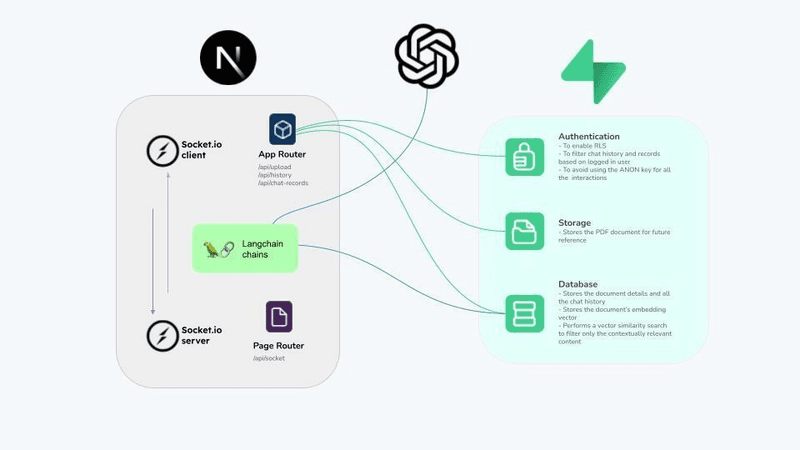
Architecture Overview
Client (React) ─▶ Next.js API Route (`/api/chat`) ─▶ LangChain Graph
      ▲                          │                     │
      │                          ├── Memory Store      │
  Streaming UI ◀─────────────────┤   Retriever (RAG)   │
                                 └── Model Provider ◀──┘
Key pieces:
- Memory (short-term): chat history per user/session.
- Retrieval (long-term): fetch facts from your docs with embeddings.
- Chains/graphs: orchestrate prompt → retrieve → generate → stream.
Install and Setup
pnpm add langchain openai zodAdd OPENAI_API_KEY to .env.local.
LangChain Building Blocks (TypeScript)
// lib/langchain.ts
import { ChatOpenAI } from "langchain/chat_models/openai";
import { ChatPromptTemplate, MessagesPlaceholder } from "langchain/prompts";
import { BufferMemory } from "langchain/memory";
import { RunnableSequence } from "langchain/schema/runnable";

export const buildChatChain = () => {
  const llm = new ChatOpenAI({ modelName: "gpt-4o-mini", temperature: 0.5 });

  const prompt = ChatPromptTemplate.fromMessages([
    ["system", "You are a concise, helpful assistant. Use provided context if available."],
    new MessagesPlaceholder("history"),
    ["user", "{input}"],
  ]);

  const memory = new BufferMemory({ returnMessages: true, memoryKey: "history" });

  // Simple no-retrieval chain; we’ll add RAG next
  const chain = RunnableSequence.from([
    {
      input: (x: { input: string }) => x.input,
      history: async () => (await memory.loadMemoryVariables({})).history,
    },
    prompt,
    llm,
  ]);

  return { chain, memory };
};
Next.js API Route: Non-Streaming
// app/api/chat/route.ts
import { NextRequest, NextResponse } from "next/server";
import { z } from "zod";
import { buildChatChain } from "@/lib/langchain";

const Body = z.object({ input: z.string().min(1) });

export const POST = async (req: NextRequest) => {
  const parsed = Body.safeParse(await req.json());
  if (!parsed.success) return NextResponse.json({ error: "Invalid body" }, { status: 400 });

  const { chain, memory } = buildChatChain();
  const result = await chain.invoke({ input: parsed.data.input });

  await memory.saveContext({ input: parsed.data.input }, { output: result.toString() });
  return NextResponse.json({ text: result.toString() });
};
Adding Retrieval (RAG) with LangChain
// lib/rag.ts
import { ChatOpenAI } from "langchain/chat_models/openai";
import { ChatPromptTemplate, MessagesPlaceholder } from "langchain/prompts";
import { RunnableSequence } from "langchain/schema/runnable";
import { BufferMemory } from "langchain/memory";
import { MemoryVectorStore } from "langchain/vectorstores/memory";
import { OpenAIEmbeddings } from "langchain/embeddings/openai";

type Doc = { id: string; text: string; source?: string };

export const buildRagChain = async (docs: Doc[]) => {
  const store = new MemoryVectorStore(new OpenAIEmbeddings());
  await store.addDocuments(docs.map((d) => ({ pageContent: d.text, metadata: { id: d.id, source: d.source } })));

  const retriever = store.asRetriever(8);
  const llm = new ChatOpenAI({ modelName: "gpt-4o-mini", temperature: 0.3 });

  const prompt = ChatPromptTemplate.fromMessages([
    [
      "system",
      "Answer using ONLY the retrieved context. If insufficient, say you don't know. Include citations like [CITATION:id].",
    ],
    new MessagesPlaceholder("history"),
    ["user", "{input}"],
  ]);

  const memory = new BufferMemory({ returnMessages: true, memoryKey: "history" });

  const chain = RunnableSequence.from([
    async (x: { input: string }) => {
      const docs = await retriever.getRelevantDocuments(x.input);
      const context = docs
        .map((d, i) => `[CITATION:${(d.metadata as any).id ?? i}] ${d.pageContent}`)
        .join("\n\n");
      return { input: `${x.input}\n\nContext:\n${context}` };
    },
    {
      input: (x: { input: string }) => x.input,
      history: async () => (await memory.loadMemoryVariables({})).history,
    },
    prompt,
    llm,
  ]);

  return { chain, memory };
};
Streaming Responses
LangChain supports streaming via the underlying model’s streamer. For a simple approach, prefer SSE in your API route and emit tokens as they arrive. For more end-to-end streaming patterns, see Integrate OpenAI into Next.js.
Client Chat UI (Minimal)
// components/LangChainChat.tsx
"use client";
import { useCallback, useMemo, useState } from "react";

export const LangChainChat = () => {
  const [messages, setMessages] = useState<string[]>([]);
  const [input, setInput] = useState("");
  const [busy, setBusy] = useState(false);
  const canSend = useMemo(() => input.trim().length > 0 && !busy, [input, busy]);

  const send = useCallback(async () => {
    if (!canSend) return;
    setBusy(true);
    const res = await fetch("/api/chat", {
      method: "POST",
      headers: { "Content-Type": "application/json" },
      body: JSON.stringify({ input }),
    });
    const data = (await res.json()) as { text?: string };
    setMessages((prev) => [...prev, `You: ${input}`, `Bot: ${data.text ?? ""}`]);
    setInput("");
    setBusy(false);
  }, [canSend, input]);

  return (
    <div className="space-y-3">
      <div className="flex gap-2">
        <input className="flex-1 rounded border px-3 py-2" value={input} onChange={(e) => setInput(e.target.value)} />
        <button className="rounded bg-black px-3 py-2 text-white disabled:opacity-50" disabled={!canSend} onClick={send}>
          {busy ? "Thinking…" : "Send"}
        </button>
      </div>
      <div className="rounded border p-3 space-y-1">
        {messages.map((m, i) => (
          <div key={i}>{m}</div>
        ))}
      </div>
    </div>
  );
};
Mount LangChainChat under any page, or wrap in your design system. For full-stack testing and deployment patterns, check AI chatbot with React + Node.
Production Tips
- Persist memory per user/session (e.g., Redis) instead of in-process
BufferMemory. - Enforce auth and rate limits in API routes; record request IDs for observability.
- For retrieval, move to a durable vector DB (e.g., pgvector, Pinecone, Weaviate).
- Add refusal behavior and structured outputs when the UI expects fields.
Common Pitfalls
- Keeping keys on the client - always proxy calls through your server.
- Over-storing history - prune and summarize to control token costs.
- Passing raw docs as context - compress to the lines that support the answer.
Where to Go Next
- Grounding with a robust pipeline: RAG for SaaS.
- Strengths and integration differences across providers: OpenAI vs Anthropic vs Gemini.
- Full Next.js integration steps and streaming: OpenAI integration guide.
Conclusion
LangChain brings composable primitives - memory, retrieval, and chains - that fit naturally into Next.js API routes and server actions. Start small: a memory-backed chat; then add retrieval and streaming. As your scope grows, persist memory, move retrieval to a real vector store, and add structured outputs and evaluations. Pair these foundations with clean SEO and internal links to keep discovery strong - our SEO best practices and VPS deployment checklist can help you ship confidently.