Most Q&A chatbots hallucinate when asked about your private docs. A reliable document Q&A bot must retrieve the right passages and answer strictly from them. In this guide, you’ll build a production-grade Q&A system in Next.js with TypeScript and LangChain, complete with ingestion, embeddings, vector search, a RAG chain, streaming responses, and practical guardrails. Use this as a blueprint for docs, wikis, changelogs, and support knowledge bases.
If you’re new to wiring OpenAI in Next.js, begin with our starter: Integrate OpenAI into Next.js. For a standalone React + Node scaffold, see AI chatbot with React + Node. For deeper retrieval patterns and multi-tenant concerns, read RAG for SaaS and our guide to Vector Databases for Semantic Search.
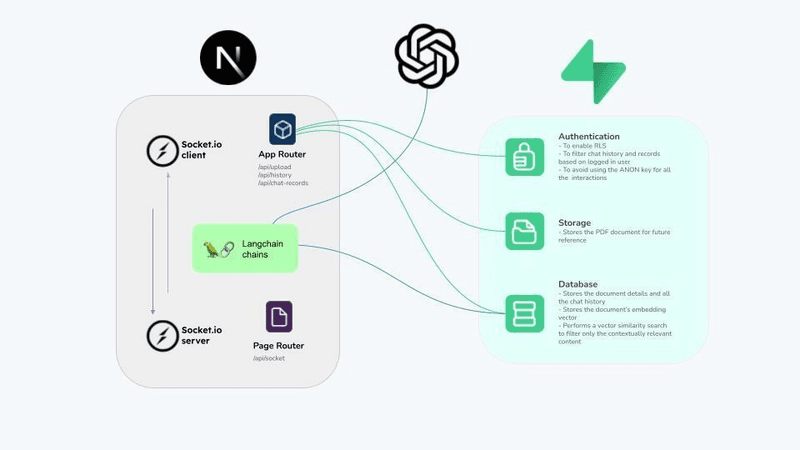
Architecture Overview
          +---------------------+           +--------------------+
          |  Ingestion Service  |           |   Embedding Model  |
          |  (parse/chunk/meta) |  embeddings vectors  ^
          +----------+----------+           +--------------------+
                     |                                |
                     v                                |
               +-----------+                          |
               | Vector DB |  <--- metadata/filters ---+
               +-----------+
                     ^
                     |
User → Next.js API → RAG Chain (retrieve → compress → prompt → generate) → Answer + Citations
Key principles:
- Keep keys server-side; never call models from the browser.
- Retrieve before generating; compress context; cite sources.
- Add refusal behavior and guardrails when context is insufficient.
Project Setup
pnpm add langchain openai zod @pinecone-database/pinecone chromadb weaviate-ts-clientEnvironment:
OPENAI_API_KEY=sk-...
PINECONE_API_KEY=pcn-...
PINECONE_ENV=us-east-1
1) Ingestion: Parse, Chunk, Embed
// lib/ingest.ts
import { createHash } from "crypto";

export type RawDoc = { id?: string; title: string; url?: string; content: string; updatedAt?: string };
export type VectorItem = { id: string; vector: number[]; metadata: Record<string, string> };

const CHUNK_SIZE = 800; // tokens (approx)
const CHUNK_OVERLAP = 120;

export const chunkText = (text: string, size = CHUNK_SIZE, overlap = CHUNK_OVERLAP): string[] => {
  const words = text.split(/\s+/);
  const chunks: string[] = [];
  let start = 0;
  while (start < words.length) {
    const end = Math.min(start + size, words.length);
    chunks.push(words.slice(start, end).join(" "));
    if (end === words.length) break;
    start = Math.max(0, end - overlap);
  }
  return chunks;
};

export const buildVectorItems = async ({ docs, embed }: { docs: RawDoc[]; embed: (chunks: string[]) => Promise<number[][]> }) => {
  const items: VectorItem[] = [];
  for (const doc of docs) {
    const chunks = chunkText(doc.content);
    const vectors = await embed(chunks);
    for (let i = 0; i < chunks.length; i++) {
      const baseId = doc.id ?? createHash("sha1").update(`${doc.title}:${doc.url ?? ""}`).digest("hex");
      items.push({
        id: `${baseId}#${i}`,
        vector: vectors[i],
        metadata: { title: doc.title, url: doc.url ?? "", updatedAt: doc.updatedAt ?? "", chunkIndex: String(i) },
      });
    }
  }
  return items;
};
// lib/embeddings.ts
import OpenAI from "openai";
const openai = new OpenAI({ apiKey: process.env.OPENAI_API_KEY });
export const embedOpenAI = async (chunks: string[]) => {
const res = await openai.embeddings.create({ model: "text-embedding-3-small", input: chunks });
return res.data.map((d) => d.embedding);
};2) Vector Store: Choose Pinecone (or Chroma/Weaviate)
// lib/pinecone.ts
import { Pinecone } from "@pinecone-database/pinecone";

const pc = new Pinecone({ apiKey: process.env.PINECONE_API_KEY! });
const index = pc.Index("docs-index");

export const pineconeUpsert = async (items: { id: string; vector: number[]; metadata: any }[]) => {
  await index.upsert({ upsertRequest: { vectors: items.map((i) => ({ id: i.id, values: i.vector, metadata: i.metadata })) } });
};

export const pineconeQuery = async (queryVector: number[], k = 12) => {
  const res = await index.query({ queryRequest: { vector: queryVector, topK: k, includeMetadata: true } });
  return res.matches?.map((m) => ({ id: m.id!, score: m.score ?? 0, text: (m.metadata as any)?.text ?? "", source: (m.metadata as any)?.url ?? "" })) ?? [];
};
For local/dev, swap Pinecone with Chroma. For feature-rich OSS/hosted, consider Weaviate. For a broader overview, see Vector Databases for Semantic Search.
3) LangChain RAG Chain (with Citations)
// lib/rag-chain.ts
import { ChatOpenAI } from "langchain/chat_models/openai";
import { ChatPromptTemplate } from "langchain/prompts";
import { RunnableSequence } from "langchain/schema/runnable";

type Retrieved = { id: string; text: string; source?: string };

export const buildRagChain = ({ retrieve }: { retrieve: (q: string) => Promise<Retrieved[]> }) => {
  const llm = new ChatOpenAI({ modelName: "gpt-4o-mini", temperature: 0.2 });

  const prompt = ChatPromptTemplate.fromTemplate(
    [
      "You answer using ONLY the provided context.",
      "If insufficient, say you don't know and ask a clarifying question.",
      "Include citations like [CITATION:id].",
      "\n\nContext:\n{context}\n\nQuestion: {question}",
    ].join(" ")
  );

  const chain = RunnableSequence.from<{
    question: string;
  }, any>([
    async ({ question }) => {
      const docs = await retrieve(question);
      const context = docs.map((d) => `[CITATION:${d.id}] ${d.text}`).join("\n\n");
      return { question, context };
    },
    prompt,
    llm,
  ]);

  return { chain };
};
4) Next.js API Route (Streaming SSE)
// app/api/docqa/route.ts
import { NextRequest } from "next/server";
import { embedOpenAI } from "@/lib/embeddings";
import { pineconeQuery } from "@/lib/pinecone";
import { buildRagChain } from "@/lib/rag-chain";

export const runtime = "nodejs";

export const POST = async (req: NextRequest) => {
  const { question } = (await req.json()) as { question?: string };
  if (!question || !question.trim()) return new Response("Missing question", { status: 400 });

  const retrieve = async (q: string) => {
    const [qVec] = await embedOpenAI([q]);
    const hits = await pineconeQuery(qVec, 12);
    return hits.map((h) => ({ id: h.id, text: h.text, source: h.source }));
  };

  const { chain } = buildRagChain({ retrieve });

  const stream = new ReadableStream<Uint8Array>({
    start: async (controller) => {
      try {
        const result = await chain.invoke({ question });
        const text = result.toString();
        controller.enqueue(new TextEncoder().encode(`data: ${JSON.stringify({ delta: text })}\n\n`));
        controller.enqueue(new TextEncoder().encode(`data: ${JSON.stringify({ done: true })}\n\n`));
      } catch (e: any) {
        controller.enqueue(new TextEncoder().encode(`data: ${JSON.stringify({ error: e?.message || "error" })}\n\n`));
      } finally {
        controller.close();
      }
    },
  });

  return new Response(stream, { headers: { "Content-Type": "text/event-stream; charset=utf-8", "Cache-Control": "no-store" } });
};
On the client, render incrementally via EventSource or ReadableStream. For a ready-made minimal UI pattern, see our AI chatbot with React + Node.
5) Client UI (Minimal)
// components/DocQA.tsx
"use client";
import { useCallback, useState } from "react";

export const DocQA = () => {
  const [q, setQ] = useState("");
  const [answer, setAnswer] = useState("");
  const [busy, setBusy] = useState(false);

  const ask = useCallback(async () => {
    setBusy(true);
    setAnswer("");
    const res = await fetch("/api/docqa", { method: "POST", headers: { "Content-Type": "application/json" }, body: JSON.stringify({ question: q }) });
    const reader = res.body?.getReader();
    if (!reader) return setBusy(false);
    const decoder = new TextDecoder();
    while (true) {
      const { done, value } = await reader.read();
      if (done) break;
      const chunk = decoder.decode(value);
      for (const line of chunk.split("\n\n")) {
        if (!line.startsWith("data:")) continue;
        const { delta, done: d } = JSON.parse(line.slice(5));
        if (delta) setAnswer((prev) => prev + delta);
        if (d) break;
      }
    }
    setBusy(false);
  }, [q]);

  return (
    <div className="space-y-3">
      <div className="flex gap-2">
        <input className="flex-1 rounded border px-3 py-2" value={q} onChange={(e) => setQ(e.target.value)} placeholder="Ask about your docs…" />
        <button className="rounded bg-black px-3 py-2 text-white disabled:opacity-50" onClick={ask} disabled={!q || busy}>
          {busy ? "Thinking…" : "Ask"}
        </button>
      </div>
      <div className="rounded border p-3 whitespace-pre-wrap min-h-40">{answer}</div>
    </div>
  );
};
6) Guardrails, Costs, and Observability
- Validate inputs (
zod), bound lengths, and enforce rate limits (Redis). - Refusal behavior: if context is insufficient, say “I don’t know” with a follow-up question.
- Log request IDs, retrieval hits, token usage, and latency percentiles.
- Cache embeddings and retrieval where safe; normalize queries for cache hits.
7) Evaluations That Matter
- Groundedness: do answers cite retrieved spans? Sample with human review.
- Retrieval: Recall@K, MRR; log queries with no answer and improve coverage.
- Answer quality: task-specific rubrics; maintain a golden set.
8) Deployment Notes
- If you deploy full-stack to a VPS/containers, follow our VPS deployment guide.
- Keep secrets in platform env; rotate keys; restrict roles/permissions in your vector DB.
- For SEO and engagement patterns across your docs, revisit Next.js SEO best practices.
9) Extensions You’ll Want Next
- Replace memory vector store with Pinecone/Weaviate; add filters (tenant, product area, recency).
- Add summarization for long answers; paginate citations with anchors.
- Structured outputs (JSON) and UI renderers; export answer+citations to tickets or docs.
Conclusion
You now have a robust blueprint for document Q&A in Next.js with LangChain: clean ingestion, embeddings, a vector store, a RAG chain with citations, and a streaming API with a minimal UI. Build small, measure quality, and iterate. For provider comparisons, read OpenAI vs Anthropic vs Gemini, and for supporting building blocks see Vector Databases for Semantic Search and LangChain + Next.js chatbot.