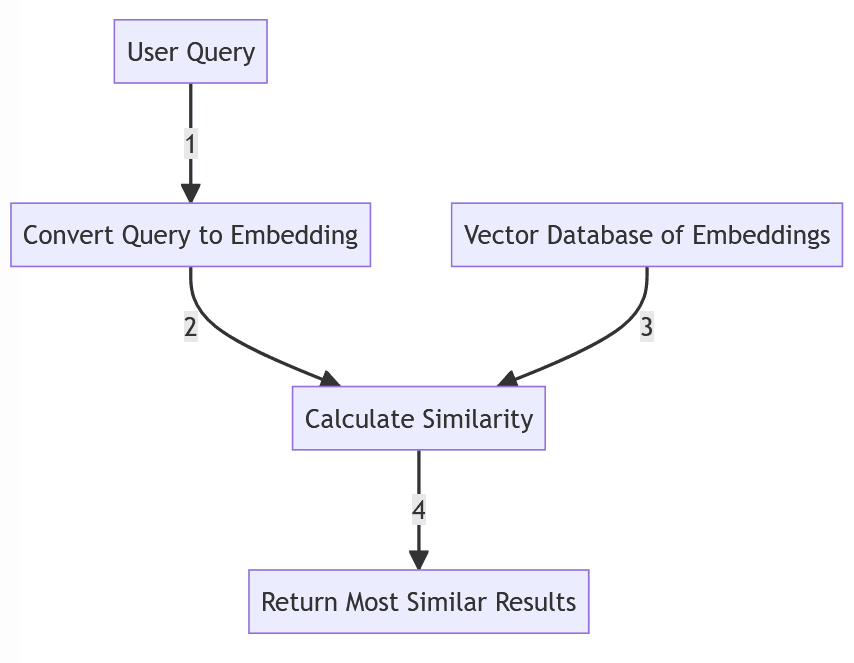
Semantic search lets users find meaning, not just matching keywords. Vector databases store embeddings (numeric vectors) of text, images, or code so you can retrieve semantically similar items. In this guide, you’ll learn the core concepts and see how to wire Pinecone, Weaviate, and Chroma with TypeScript. We’ll also cover hybrid retrieval (semantic + keyword), ingestion, and practical tips for production.
If you’re integrating AI into your app, start with Integrate OpenAI into Next.js. For context-aware chat and RAG, check RAG for SaaS and our AI chatbot with React + Node.
Architecture Overview
Raw Docs (MD, HTML, PDFs) ─▶ Ingestion (parse → chunk → embed) ─▶ Vector DB
                                                 │
                                              Metadata (source, section, ACLs)
                                                 │
User Query ─▶ Query Rewrite ─▶ Hybrid Retrieval (Vector + Keyword) ─▶ Rerank/Compress ─▶ LLM Answer
Core Concepts
- Embeddings: fixed-length numeric vectors representing meaning; cosine similarity for closeness.
- Chunking: split docs into semantically coherent pieces with overlaps.
- Metadata: store title, URL, section, access controls for filters and citations.
- Hybrid retrieval: combine vector search with BM25 to catch rare terms/IDs.
Project Setup
pnpm add openai zod
pnpm add @pinecone-database/pinecone weaviate-ts-client chromadb
Set environment variables:
OPENAI_API_KEY=sk-...
PINECONE_API_KEY=pcn-...
PINECONE_ENV=us-east-1
WEAVIATE_URL=https://your-weaviate-host
WEAVIATE_API_KEY=wv-...
Ingestion and Embeddings (TypeScript)
// lib/ingest.ts
import { createHash } from "crypto";

export type RawDoc = { id?: string; title: string; url?: string; content: string; updatedAt?: string };
export type VectorItem = { id: string; vector: number[]; metadata: Record<string, string> };
export type EmbeddingFn = (inputs: string[]) => Promise<number[][]>;

const CHUNK_SIZE = 800;
const CHUNK_OVERLAP = 120;

export const chunkText = (text: string, size = CHUNK_SIZE, overlap = CHUNK_OVERLAP) => {
  const words = text.split(/\s+/);
  const chunks: string[] = [];
  let start = 0;
  while (start < words.length) {
    const end = Math.min(start + size, words.length);
    chunks.push(words.slice(start, end).join(" "));
    if (end === words.length) break;
    start = Math.max(0, end - overlap);
  }
  return chunks;
};

export const embedDocs = async ({ docs, embed }: { docs: RawDoc[]; embed: EmbeddingFn }) => {
  const items: VectorItem[] = [];
  for (const doc of docs) {
    const chunks = chunkText(doc.content);
    const vectors = await embed(chunks);
    for (let i = 0; i < chunks.length; i++) {
      const baseId = doc.id ?? createHash("sha1").update(`${doc.title}:${doc.url ?? ""}`).digest("hex");
      const id = `${baseId}#${i}`;
      items.push({
        id,
        vector: vectors[i],
        metadata: { title: doc.title, url: doc.url ?? "", updatedAt: doc.updatedAt ?? "", chunkIndex: String(i) },
      });
    }
  }
  return items;
};
You can call OpenAI’s embedding endpoint to generate vectors:
// lib/embeddings.ts
import OpenAI from "openai";

const openai = new OpenAI({ apiKey: process.env.OPENAI_API_KEY });

export const embedOpenAI = async (chunks: string[]) => {
  const res = await openai.embeddings.create({ model: "text-embedding-3-small", input: chunks });
  return res.data.map((d) => d.embedding);
};
Pinecone: Upsert and Query
// lib/pinecone.ts
import { Pinecone } from "@pinecone-database/pinecone";

const pc = new Pinecone({ apiKey: process.env.PINECONE_API_KEY! });
const index = pc.Index("docs-index");

export const pineconeUpsert = async (items: { id: string; vector: number[]; metadata: any }[]) => {
  await index.upsert({
    upsertRequest: { vectors: items.map((i) => ({ id: i.id, values: i.vector, metadata: i.metadata })) },
  });
};

export const pineconeQuery = async (queryVector: number[], k = 12) => {
  const res = await index.query({ queryRequest: { vector: queryVector, topK: k, includeMetadata: true } });
  return res.matches?.map((m) => ({ id: m.id!, score: m.score ?? 0, metadata: m.metadata ?? {} })) ?? [];
};
Weaviate: Upsert and Query
// lib/weaviate.ts
import weaviate from "weaviate-ts-client";

const client = weaviate.client({
  scheme: "https",
  host: process.env.WEAVIATE_URL!.replace(/^https?:\/\//, ""),
  apiKey: new weaviate.ApiKey(process.env.WEAVIATE_API_KEY!),
});

const CLASS = "DocChunk";

export const weaviateUpsert = async (items: { id: string; vector: number[]; metadata: any }[]) => {
  const batcher = client.batch.objectsBatcher();
  for (const i of items) {
    batcher.withObject({
      id: i.id,
      class: CLASS,
      properties: i.metadata,
      vector: i.vector,
    });
  }
  await batcher.do();
};

export const weaviateQuery = async (queryVector: number[], k = 12) => {
  const res = await client.graphql.get().withClassName(CLASS).withNearVector({ vector: queryVector }).withLimit(k).do();
  const data = (res.data as any).Get?.[CLASS] ?? [];
  return data.map((obj: any) => ({ id: obj._additional?.id, score: obj._additional?.certainty ?? 0, metadata: obj }));
};
Chroma: Upsert and Query (Local)
// lib/chroma.ts
import { ChromaClient } from "chromadb";

const chroma = new ChromaClient();

export const ensureCollection = async (name: string) => {
  try {
    return await chroma.getCollection({ name });
  } catch {
    return await chroma.createCollection({ name });
  }
};

export const chromaUpsert = async (collectionName: string, items: { id: string; vector: number[]; metadata: any }[]) => {
  const col = await ensureCollection(collectionName);
  await col.upsert({ ids: items.map((i) => i.id), embeddings: items.map((i) => i.vector), metadatas: items.map((i) => i.metadata) });
};

export const chromaQuery = async (collectionName: string, queryVector: number[], k = 12) => {
  const col = await ensureCollection(collectionName);
  const res = await col.query({ queryEmbeddings: [queryVector], nResults: k, include: ["metadatas", "distances"] });
  return (res.ids?.[0] || []).map((id: string, i: number) => ({ id, score: 1 - (res.distances?.[0]?.[i] ?? 0), metadata: res.metadatas?.[0]?.[i] }));
};
Putting It Together: Minimal Next.js API
// app/api/search/route.ts
import { NextRequest, NextResponse } from "next/server";
import { embedOpenAI } from "@/lib/embeddings";
import { pineconeQuery } from "@/lib/pinecone";
// swap with weaviateQuery or chromaQuery to compare

export const POST = async (req: NextRequest) => {
  const { query } = (await req.json()) as { query?: string };
  if (!query) return NextResponse.json({ error: "Missing query" }, { status: 400 });
  const [qVec] = await embedOpenAI([query]);
  const results = await pineconeQuery(qVec, 12);
  return NextResponse.json({ results });
};
For a complete retrieval+generation flow (RAG), layer this search in front of an LLM. See RAG for SaaS and our Next.js OpenAI integration.
Hybrid Retrieval and Reranking
Combine lexical (BM25) with semantic vectors, then rerank results.
// lib/hybrid.ts
type Retrieved = { id: string; text: string; score: number };

export const rerankByOverlap = (query: string, items: Retrieved[]) => {
  const terms = new Set(query.toLowerCase().split(/[^a-z0-9]+/).filter(Boolean));
  return [...items]
    .map((c) => {
      const overlap = c.text
        .toLowerCase()
        .split(/[^a-z0-9]+/)
        .reduce((acc, t) => acc + (terms.has(t) ? 1 : 0), 0);
      return { ...c, score: c.score + overlap * 0.01 };
    })
    .sort((a, b) => b.score - a.score);
};
Choosing a Vector DB
- Pinecone: managed, easy scaling, fast, production-ready filters and namespaces.
- Weaviate: feature-rich OSS/hosted, hybrid search options, GraphQL interface.
- Chroma: local development and small deployments; very simple API.
Evaluate on your data: query recall@k, latency percentiles, ingestion speed, filter capabilities, and total cost of ownership.
Production Tips
- Normalize text during ingestion; lower‑case, strip boilerplate, track versions.
- Keep stable chunk IDs for citations and re‑ingestion.
- Enforce permissions during retrieval (not in prompts).
- Cache embeddings for identical chunks; use concurrency limits.
If you’re deploying full‑stack on a VPS or containers, apply the steps in Deploy Next.js on a VPS. For a guided chat experience with retrieval, pair this with our LangChain + Next.js chatbot.
Conclusion
Vector databases unlock semantic search and grounded AI experiences. Start small with Chroma locally, validate recall and latency, then scale into Pinecone or Weaviate with hybrid retrieval, filters, and monitoring. Wire your search endpoint into a RAG flow and add structured outputs for predictable UI. Continue with our RAG for SaaS, OpenAI Next.js integration, and AI chatbot guide.