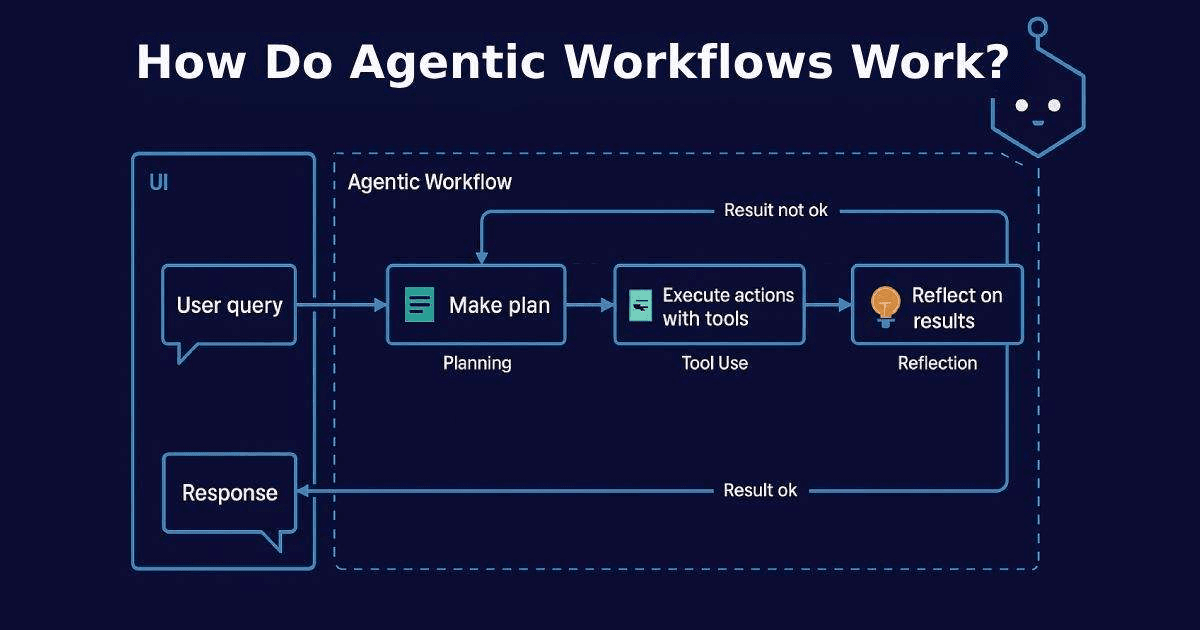
Agentic workflows coordinate a loop of planning, acting (calling tools), observing results, and iterating until goals are met. This guide shows how to automate developer tasks - triage issues, generate boilerplate, run tests, open PRs - using TypeScript, with a Next.js API that streams progress to the UI
For foundations: integrate models cleanly with OpenAI in Next.js. For retrieval and grounded answers, see RAG for SaaS and Vector Databases. For app scaffolds, check the AI Chatbot guide and LangChain + Next.js chatbot.
Architecture Overview
User Goal → Planner → Tool Selection → Action → Observation → (loop) → Report/PR

Tools: repo search, code edit, run tests, create branch/PR, fetch docs/metrics
State: current goal, scratchpad, observations, constraint checklist
Guardrails: policy checks, rate limits, human-in-the-loop approvals
Agent Loop (TypeScript)
// lib/agent/loop.ts
type Tool = {
  name: string;
  description: string;
  call: (args: Record<string, any>) => Promise<{ output: string; artifacts?: Record<string, any> }>;
};

type Step = { thought: string; tool?: string; args?: Record<string, any>; observation?: string };

export const runAgent = async ({ goal, tools, maxSteps = 12, emit }: {
  goal: string;
  tools: Tool[];
  maxSteps?: number;
  emit?: (event: any) => void;
}) => {
  const log = (e: any) => emit?.(e);
  const scratch: Step[] = [];

  for (let i = 0; i < maxSteps; i++) {
    // naive planner (replace with LLM planner)
    const stepPlan = i === 0
      ? { thought: `Plan: understand goal → choose tool`, tool: tools[0]?.name }
      : { thought: `Iterate based on observation`, tool: tools[0]?.name };

    log({ type: "plan", step: i + 1, plan: stepPlan });

    const tool = tools.find((t) => t.name === stepPlan.tool);
    if (!tool) {
      scratch.push({ thought: stepPlan.thought });
      break;
    }

    const args = { query: goal };
    const result = await tool.call(args);
    scratch.push({ thought: stepPlan.thought, tool: tool.name, args, observation: result.output });
    log({ type: "observation", step: i + 1, output: result.output });

    if (result.output.includes("DONE")) break;
  }

  return { steps: scratch };
};
Example Tools
// lib/agent/tools.ts
import fs from "node:fs/promises";

export const searchRepo = {
  name: "searchRepo",
  description: "Search the repository for a string",
  call: async ({ query }: { query: string }) => {
    // naive placeholder search
    return { output: `Searched for: ${query}. DONE` };
  },
};

export const createFile = {
  name: "createFile",
  description: "Create a file with content",
  call: async ({ path, content }: { path: string; content: string }) => {
    await fs.writeFile(path, content, "utf8");
    return { output: `File created at ${path}` };
  },
};
Next.js API Route (SSE Streaming)
// app/api/agent/route.ts
import { NextRequest } from "next/server";
import { runAgent } from "@/lib/agent/loop";
import { searchRepo } from "@/lib/agent/tools";

export const POST = async (req: NextRequest) => {
  const { goal } = (await req.json()) as { goal?: string };
  if (!goal) return new Response("Missing goal", { status: 400 });

  const stream = new ReadableStream<Uint8Array>({
    start: async (controller) => {
      const enc = new TextEncoder();
      const emit = (e: any) => controller.enqueue(enc.encode(`data: ${JSON.stringify(e)}\n\n`));
      try {
        const result = await runAgent({ goal, tools: [searchRepo], emit });
        emit({ type: "final", result });
        controller.enqueue(enc.encode(`data: ${JSON.stringify({ done: true })}\n\n`));
      } catch (e: any) {
        emit({ type: "error", message: e?.message || "error" });
      } finally {
        controller.close();
      }
    },
  });
  return new Response(stream, { headers: { "Content-Type": "text/event-stream; charset=utf-8", "Cache-Control": "no-store" } });
};
UI: Streaming Progress
// components/AgentRunner.tsx
"use client";
import { useCallback, useState } from "react";

export const AgentRunner = () => {
  const [goal, setGoal] = useState("");
  const [logs, setLogs] = useState<string[]>([]);

  const run = useCallback(async () => {
    setLogs([]);
    const res = await fetch("/api/agent", { method: "POST", headers: { "Content-Type": "application/json" }, body: JSON.stringify({ goal }) });
    const reader = res.body?.getReader();
    if (!reader) return;
    const dec = new TextDecoder();
    while (true) {
      const { done, value } = await reader.read();
      if (done) break;
      for (const line of dec.decode(value).split("\n\n")) {
        if (!line.startsWith("data:")) continue;
        setLogs((prev) => [...prev, line.slice(5)]);
      }
    }
  }, [goal]);

  return (
    <div className="space-y-3">
      <div className="flex gap-2">
        <input className="flex-1 rounded border px-3 py-2" value={goal} onChange={(e) => setGoal(e.target.value)} placeholder="E.g., add CI badge to README" />
        <button className="rounded bg-black px-3 py-2 text-white disabled:opacity-50" onClick={run} disabled={!goal}>Run</button>
      </div>
      <pre className="rounded border p-3 whitespace-pre-wrap text-sm">{logs.join("\n")}</pre>
    </div>
  );
};
Guardrails and Human-in-the-Loop
- Require approvals before destructive actions (commits, PR merges).
- Add policy checks (file allowlists, path constraints, test pass gates).
- Log every action with parameters and results; enable audit trails.
What to Automate First
- Repo hygiene: format, lint, simple refactors with tests.
- Docs updates: changelog, README badges, broken links fixes.
- Issue triage: label, prioritize, create templates.
For provider selection and trade-offs, see OpenAI vs Anthropic vs Gemini. For retrieval to fetch design docs or standards, use RAG for SaaS and Vector Databases.
Conclusion
Agentic workflows aren’t magic - they’re disciplined loops with explicit tools, state, and guardrails. Start narrow: one goal, a few tools, streaming logs, and approvals. Iterate toward higher autonomy only when evaluations show reliability. Keep the UX fast and transparent, wire in your CI checks, and add retrieval to ground decisions.