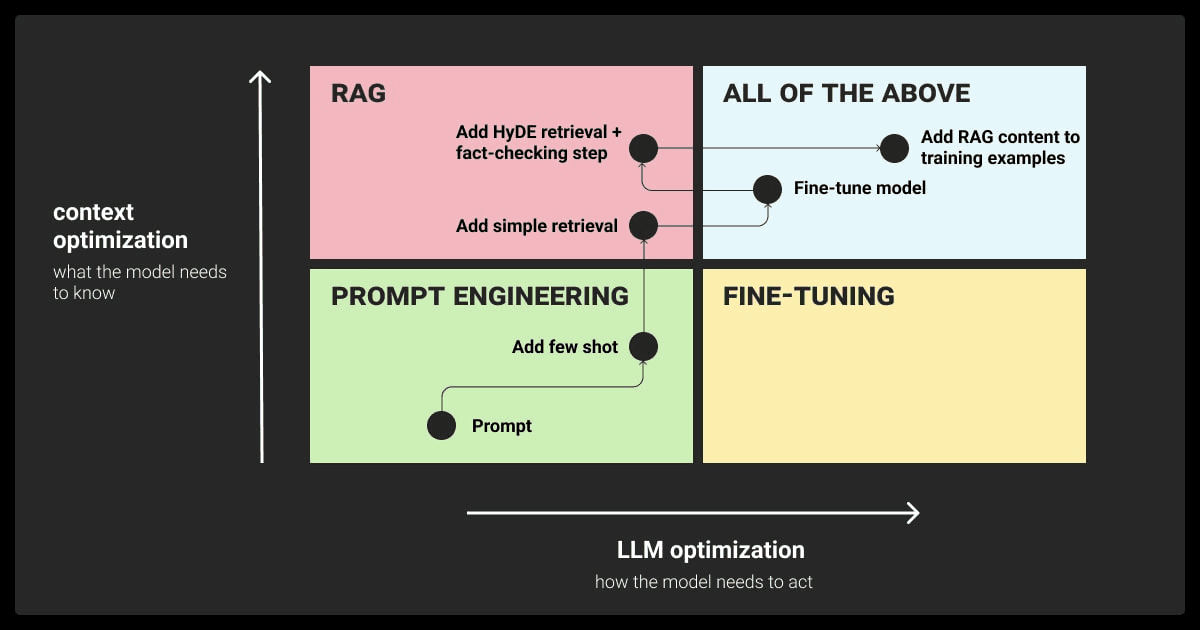
Fine-tuning lets you steer a model toward your voice, schema, or task - classification, extraction, style, or domain-specific transforms. While prompting or RAG often suffice, fine-tuning shines when you need consistent structure, specific voice, or low-latency small models that internalize your patterns. This guide is a practical, end-to-end playbook for data design, JSONL prep, uploads, fine-tune job lifecycle, evaluations, and a Next.js integration.
If you’re wiring AI into a product, you may also want RAG for freshness and citations: see RAG for SaaS, our OpenAI Next.js integration, and data infra via Vector Databases. For app scaffolds, start with AI chatbot with React + Node or LangChain + Next.js chatbot.
When to Fine-Tune (and When Not To)
- Prefer prompting + RAG if knowledge freshness/citations matter.
- Fine-tune when outputs must be highly consistent (JSON schemas) and style-latched.
- Fine-tune small, fast models for low-latency, cost-sensitive workloads.
Architecture Overview
       +------------------+        +------------------+         +----------------+
       |  Data Curation   |  --->  |  Preprocess/QA   |  --->   |   JSONL Files  |
       +------------------+        +------------------+         +----------------+
                 |                          |                           |
                 v                          v                           v
          +-------------+           +--------------+             +---------------+
          |  Uploads    |  ----->   | Fine-tune Job|  ----->     |  Fine-tuned   |
          |  (OpenAI)   |           | Lifecycle    |             |    Model      |
          +-------------+           +--------------+             +---------------+
                 ^                          |                           |
                 |                          v                           v
                 |                 +------------------+          +-------------------+
                 |                 |  Evaluation      |  ----->  |  Deployment (API) |
                 |                 +------------------+          +-------------------+
Data Design: The Most Important Step
Define clear tasks and schemas. Keep examples short but numerous. Capture failure modes with counter-examples and corrections. For extraction/classification, lock a strict JSON schema and validate.
// lib/ft-schemas.ts
import { z } from "zod";

export const OutputSchema = z.object({
  category: z.enum(["bug", "feature", "billing", "account", "other"]),
  urgency: z.enum(["low", "medium", "high"]) ,
  summary: z.string(),
});

export type Output = z.infer<typeof OutputSchema>;
Prepare JSONL Training/Validation Files
OpenAI expects JSONL with { "messages": [ ... ] } for chat fine-tunes. Keep validation holdout.
// scripts/build-jsonl.ts
import fs from "node:fs";

type ChatTurn = { role: "system" | "user" | "assistant"; content: string };
type Row = { messages: ChatTurn[] };

const SYSTEM = "You are a classifier. Return strict JSON matching the schema.";

const train: Row[] = [
  {
    messages: [
      { role: "system", content: SYSTEM },
      { role: "user", content: "My invoice wasn’t generated this month." },
      { role: "assistant", content: "{\"category\":\"billing\",\"urgency\":\"medium\",\"summary\":\"Invoice missing\"}" },
    ],
  },
  // add thousands of rows ...
];

const val: Row[] = [ /* holdout examples */ ];

fs.writeFileSync("train.jsonl", train.map((r) => JSON.stringify(r)).join("\n"));
fs.writeFileSync("val.jsonl", val.map((r) => JSON.stringify(r)).join("\n"));
Upload, Create Fine-Tune, Track Status
// scripts/fine-tune.ts
import OpenAI from "openai";
import fs from "node:fs";

const openai = new OpenAI({ apiKey: process.env.OPENAI_API_KEY });

const upload = async (path: string) => {
  const file = await openai.files.create({ file: fs.createReadStream(path) as any, purpose: "fine-tune" });
  return file.id;
};

const run = async () => {
  const trainFileId = await upload("train.jsonl");
  const valFileId = await upload("val.jsonl");

  const job = await openai.fineTuning.jobs.create({
    model: "gpt-4o-mini", // or a smaller base
    training_file: trainFileId,
    validation_file: valFileId,
    hyperparameters: {
      n_epochs: 3,
    },
  });

  console.log("job", job.id);

  // Poll status
  while (true) {
    const current = await openai.fineTuning.jobs.retrieve(job.id);
    console.log(current.status);
    if (["succeeded", "failed", "cancelled"].includes(current.status)) break;
    await new Promise((r) => setTimeout(r, 10_000));
  }
};

run().catch((e) => {
  console.error(e);
  process.exit(1);
});
Using the Fine-Tuned Model
// lib/ft-client.ts
import OpenAI from "openai";

const openai = new OpenAI({ apiKey: process.env.OPENAI_API_KEY });

export const classify = async (model: string, text: string) => {
  const res = await openai.chat.completions.create({
    model, // fine-tuned model name
    messages: [
      { role: "system", content: "You are a classifier. Return strict JSON." },
      { role: "user", content: text },
    ],
    temperature: 0,
  });
  return res.choices[0]?.message?.content ?? "";
};
Integrating with Next.js API
// app/api/classify/route.ts
import { NextRequest, NextResponse } from "next/server";
import { z } from "zod";
import { classify } from "@/lib/ft-client";

const Body = z.object({ text: z.string().min(1), model: z.string().min(1) });

export const POST = async (req: NextRequest) => {
  const parsed = Body.safeParse(await req.json());
  if (!parsed.success) return NextResponse.json({ error: "Invalid body" }, { status: 400 });
  const { text, model } = parsed.data;
  const output = await classify(model, text);
  return NextResponse.json({ output });
};
Evaluations: What to Measure
- Structure adherence (JSON validation rate)
- Task accuracy (precision/recall for classification)
- Style fidelity (BLEU/ROUGE or simpler heuristics for style tasks)
- Latency and cost per request
// scripts/eval.ts
import { OutputSchema } from "@/lib/ft-schemas";

type Case = { input: string; expected: { category: string } };

export const evaluate = (cases: Case[], modelCall: (input: string) => Promise<string>) =>
  Promise.all(
    cases.map(async (c) => {
      const raw = await modelCall(c.input);
      let ok = false;
      try {
        const parsed = OutputSchema.parse(JSON.parse(raw));
        ok = parsed.category === c.expected.category;
      } catch {}
      return { input: c.input, ok };
    })
  );
Safety and Guardrails
- Filter/normalize training data; avoid sensitive examples.
- Add refusal rules for out-of-domain inputs.
- Keep an audit trail of training data sources.
Cost Controls
- Start with small base models.
- Keep examples concise and focused.
- Use
n_epochssparingly; overfitting hurts generalization.
Deployment Notes
- Store model name in config; rotate via feature flag.
- Add a fallback to a non-fine-tuned prompt when the model is unavailable.
- Log inputs/outputs with PII redaction.
For broader app integration and performance hygiene, see OpenAI Next.js integration, compare providers in OpenAI vs Anthropic vs Gemini, and consider pairing fine-tunes with retrieval from Vector Databases.
FAQs
Do I still need RAG if I fine-tune? Yes, when freshness and citations matter. Fine-tunes do not "learn" new facts reliably; they learn patterns.
How big should my dataset be? Start with hundreds; scale to thousands for complex patterns. Measure and iterate.
Can I export or move a fine-tuned model? Check provider constraints; generally, model weights remain hosted by the provider.
Conclusion
Fine-tuning is a precision tool: use it to lock style and structure and to shift small models toward your domain. Combined with retrieval and robust evaluations, it delivers predictable behavior under cost and latency budgets. Use this tutorial as a living playbook - curate data, validate schemas, track job health, and wire clean APIs. For next steps, expand into RAG for SaaS, strengthen your search with Vector Databases, and tighten your UI/SEO via Next.js SEO best practices.