Artificial intelligence (AI) automation can compress weeks of work into hours, scale operations on demand, and unlock new capabilities. It can also amplify mistakes, introduce opaque risks, and incur hidden costs if rushed. This guide takes a practical, no‑hype view: when to automate with AI, when to wait, and how to do it safely.
TL;DR
- Big upside: speed, scale, coverage, cost efficiency, consistency, 24/7 availability, new insights.
- Real risks: errors, bias, data leakage, brittleness, vendor lock‑in, compliance gaps, hidden ops costs.
- Win conditions: clear objectives, high‑quality data, human‑in‑the‑loop for high‑impact steps, strong monitoring, fast rollback.
- Start small: pilot on low‑risk, high‑volume tasks; measure; iterate; then scale.
What Counts as “AI Automation”?
- Rules automation: deterministic workflows (BPMN/RPA). Great for stable, well‑specified processes.
- ML automation: classification, ranking, forecasting with trained models.
- Generative AI: LLMs/agents for text/code/images; retrieval‑augmented generation (RAG) for grounded answers.
Most real systems blend these: rules for guardrails, ML for predictions, GenAI for flexible reasoning and language.
The Pros
1) Speed and Throughput
AI agents handle repetitive tasks quickly and in parallel, shrinking cycle times from days to minutes (e.g., triaging support tickets, summarizing logs, drafting responses).
2) Consistency and Coverage
Machines don’t tire. They apply the same checklist every time and can analyze 100% of events (not just samples), improving quality and auditability.
3) Cost Efficiency at Scale
After setup, marginal costs per task trend down. Elastic capacity helps absorb spikes without hiring sprints.
4) New Capabilities
LLMs enable natural‑language interfaces, rapid content drafting, and cross‑system orchestration that was previously impractical.
5) Always‑On Operations
24/7 availability reduces wait times and improves customer experience in support, onboarding, and internal tooling.
The Cons (and How to Mitigate)
1) Hallucinations and Errors
LLMs can sound confident while being wrong.
- Mitigate with: retrieval (RAG), tool use (function calling), constrained outputs (schemas), reference links, and human review on high‑impact actions.
2) Bias and Compliance Risk
Models can reflect biased training data or mishandle sensitive data.
- Mitigate with: dataset audits, red‑team tests, PII scrubbing, allow/deny‑lists, regional data residency, and documented DPIA where required.
3) Brittleness to Change
Small prompt or data shifts can degrade results.
- Mitigate with: evaluation suites, canary deploys, prompt versioning, fallback models, and regression monitors.
4) Hidden Operations Costs
Observability, labeling, prompt maintenance, retries, and review queues add ongoing cost.
- Mitigate with: explicit SLOs, cost budgets, autoscaling policies, and workflow‑level ROI tracking.
5) Vendor Lock‑In and Drift
APIs, pricing, and model behaviors change.
- Mitigate with: model abstraction layers, multi‑vendor support, and contracts with change‑notification clauses.
6) Security and Data Leakage
Prompts and context may expose secrets if not handled carefully.
- Mitigate with: encryption, vault‑based secret injection, strict context filters, and redaction.
Where AI Automation Fits Best
- High volume, repetitive tasks: tagging, routing, summarization, extraction.
- Well‑bounded domains: strong documentation, clear policies, reliable ground truth.
- Tolerated error with review: drafts that humans approve (emails, briefs, categorizations).
- Latency‑insensitive back office: nightly reconciliations, QA sweeps, report generation.
Use caution for safety‑critical or legally binding actions without robust controls.
Quick Qualification Matrix
| Criterion | Good for Automation | Needs Caution |
|---|---|---|
| Data quality | Clean, current, labeled | Sparse, noisy, confidential |
| Rules clarity | Documented, enforceable | Ambiguous, evolving |
| Impact of errors | Low to moderate | High, irreversible |
| Human oversight | Easy to review | Hard to validate |
| Observability | Metrics, logs, traces | Little visibility |
Implementation Checklist
- Define the objective, guardrails, and unacceptable failures.
- Map the workflow and enumerate exceptions; decide the human‑in‑the‑loop points.
- Assess data availability, sensitivity, and quality; plan redaction and access controls.
- Choose architecture: rules + ML + LLM with retrieval/tooling as needed.
- Design prompts and tools; fix outputs to schemas; enforce idempotency for side‑effects.
- Build evaluation: golden datasets, acceptance criteria, and automatic regressions.
- Add observability: cost, latency, quality scores, error taxonomies, drift alerts.
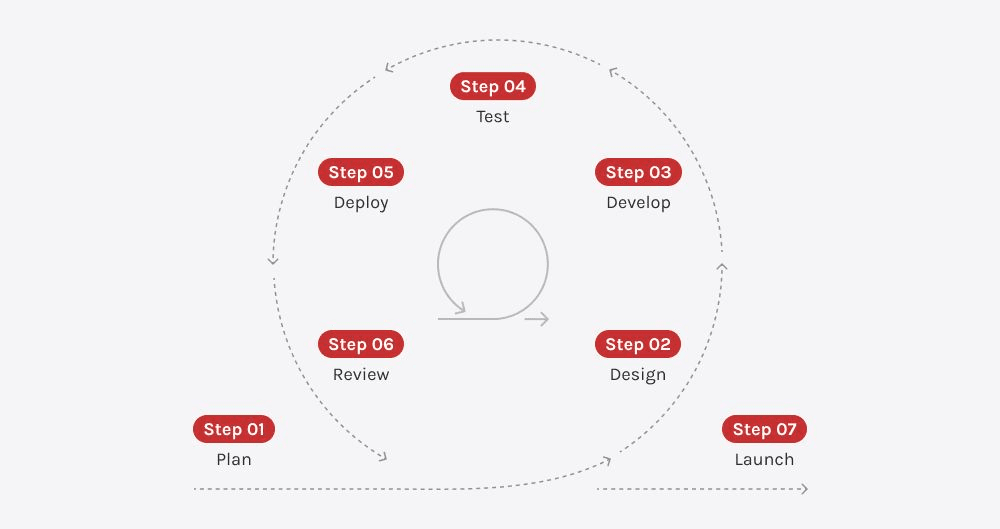
- Pilot in a low‑risk slice; A/B test vs control; gather qualitative feedback.
- Create rollback and fallback paths; document failure playbooks.
- Train users; publish SLAs/SLOs; review quarterly for policy and model updates.
Metrics That Matter
- Quality: task accuracy, groundedness score, review rejection rate.
- Speed: end‑to‑end latency, queue time, throughput.
- Cost: per‑task cost, token/CPU usage, review minutes per task.
- Reliability: time‑to‑detect, time‑to‑rollback, failure rate by category.
- Impact: revenue lift, CSAT, SLA adherence, backlog reduction.
Reference Architecture (Conceptual)
- Ingest queue → pre‑processor (redaction/normalization) → router → tools/LLM → validator → review queue → actuator (APIs) → ledger + analytics.
- Use feature flags for gradual rollout; keep an explicit manual mode.
Common Pitfalls
- Shipping a “demo prompt” to production without evaluations or guardrails.
- Treating cost as only API fees (ignoring ops and review costs).
- Automating rare, high‑risk decisions before low‑risk, high‑volume work.
- No owner for long‑term maintenance, prompting, and evaluation datasets.
Conclusion
AI automation is a powerful lever - but only with the right problem, data, and controls. Start with narrow, measurable workflows, keep humans in the loop where impact is high, invest in monitoring, and iterate. Done well, automation compounds: every feedback loop improves the next task you automate.