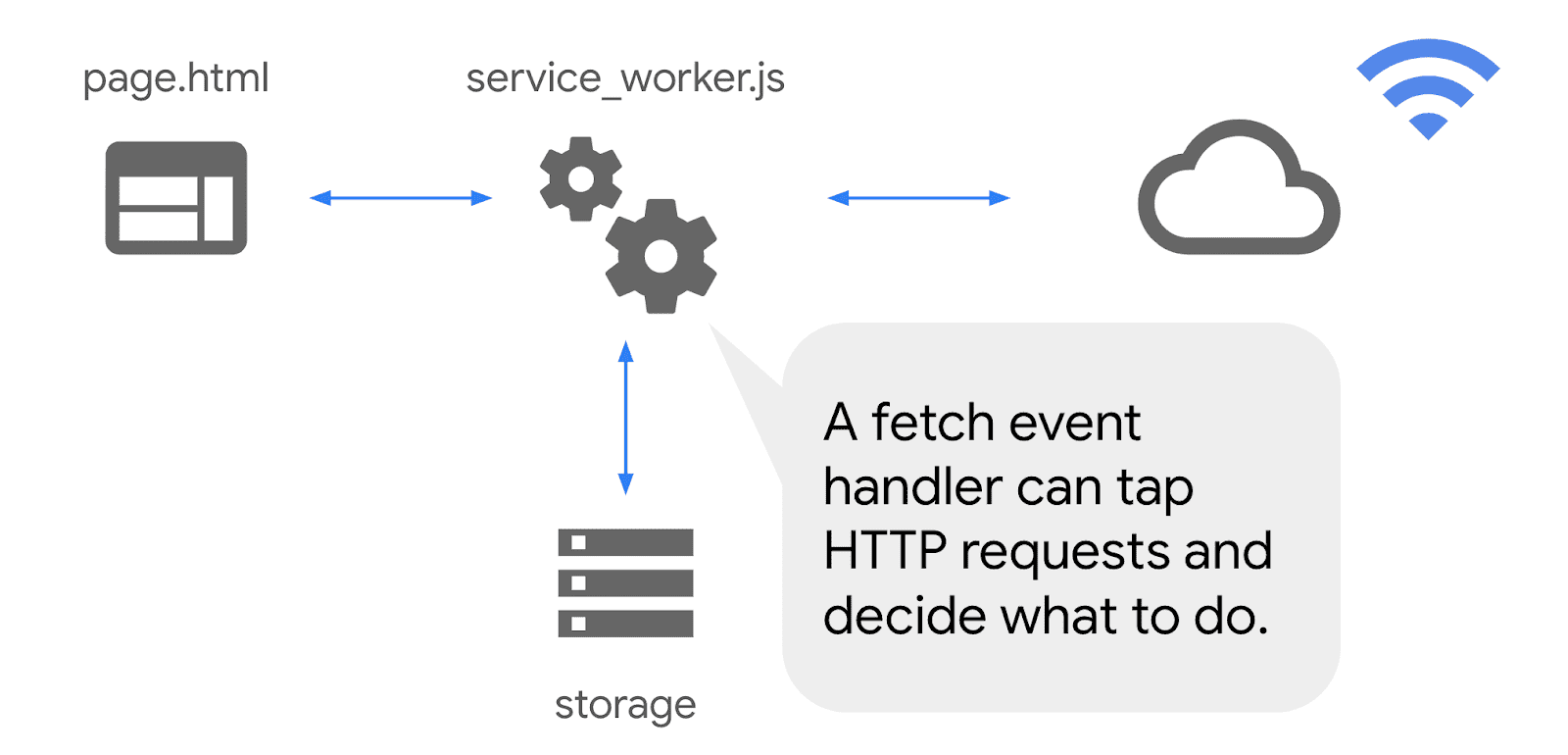
Offline support turns a good web app into a resilient one. You are no longer hostage to flaky coffee shop WiFi or subway tunnels. In practice, offline capability is a set of small, disciplined choices: cache what matters, queue writes, design graceful fallbacks, and keep your service worker simple enough that future you can debug it.
If you are using Next.js, the patterns here map cleanly to the App Router. For discoverability and metadata polish, keep our Next.js SEO Best Practices nearby. For deployment knobs that affect caching and TLS, see Deploy Next.js on a VPS. If you plan to summarize runtime metrics for stakeholders later, you might appreciate the patterns in AI summarized dashboards.
PWA Requirements - checklist you actually need
At a minimum:
- Web App Manifest with name, icons, theme colors, and display mode.
- Service worker registered on first load and updated safely.
- HTTPS everywhere, correct scopes, and cache headers.
- Offline fallback page and a clear error vocabulary in the UI.
Nice to have:
- Background sync for queued writes.
- Pre-cached critical shell and lazy caching for the rest.
- Content index for predictable offline reads.
Architecture - what runs where
User
  │
  ▼
Browser ←→ Service Worker (network proxy, caches, background tasks)
  │             │
  │             ├── Precache: app shell, icons, fonts
  │             ├── Runtime cache: API responses, images
  │             └── Background sync: queued POST/PUT/DELETE
  ▼
Next.js Server / Edge (RSC, API Routes, image optimization)
  │
  ▼
Data stores (DB, KV, object storage)
The service worker sits between your app and the network. Keep its responsibilities narrow: caching and request replay. Push complex logic to your server.
Manifest - the installable bits
Add a manifest and link it in your layout.
// public/manifest.webmanifest
{
  "name": "Offline Ready App",
  "short_name": "OfflineApp",
  "start_url": "/",
  "display": "standalone",
  "background_color": "#ffffff",
  "theme_color": "#000000",
  "icons": [
    { "src": "/android-chrome-192x192.png", "sizes": "192x192", "type": "image/png" },
    { "src": "/android-chrome-512x512.png", "sizes": "512x512", "type": "image/png" }
  ]
}
// app/layout.tsx
export const metadata = {
other: {
link: [
{ rel: "manifest", href: "/site.webmanifest" },
{ rel: "apple-touch-icon", href: "/apple-touch-icon.png" },
{ rel: "icon", href: "/favicon-32x32.png" },
],
},
};Note: your repo already contains icons and a site.webmanifest. Align fields as needed.
Service worker registration - Next.js friendly
Register the worker on the client. Prefer a small module and a single place to call it.
// components/ServiceWorkerRegister.tsx
"use client";
import { useEffect } from "react";

const SW_PATH = "/sw.js";

export const ServiceWorkerRegister = () => {
  useEffect(() => {
    if (typeof window === "undefined" || !("serviceWorker" in navigator)) return;
    const register = async () => {
      try {
        const reg = await navigator.serviceWorker.register(SW_PATH, { scope: "/" });
        // Optionally listen for updates
        reg.addEventListener("updatefound", () => {
          const installing = reg.installing;
          if (!installing) return;
          installing.addEventListener("statechange", () => {
            if (installing.state === "installed" && navigator.serviceWorker.controller) {
              console.log("New content is available; please refresh.");
            }
          });
        });
      } catch (e) {
        console.warn("SW register failed", e);
      }
    };
    register();
  }, []);
  return null;
};
Render it once in your root layout or top level page.
A minimal service worker - TypeScript and safe defaults
Keep it small. Precache a tiny shell, then cache at runtime using a network-first policy for HTML and a stale-while-revalidate policy for static assets and JSON.
// public/sw.js
const VERSION = "v1";
const PRECACHE = ["/", "/favicon-32x32.png", "/apple-touch-icon.png"];

self.addEventListener("install", (event) => {
  event.waitUntil(
    caches.open(VERSION).then((cache) => cache.addAll(PRECACHE)).then(() => self.skipWaiting())
  );
});

self.addEventListener("activate", (event) => {
  event.waitUntil(
    caches.keys().then((keys) =>
      Promise.all(keys.filter((k) => k !== VERSION).map((k) => caches.delete(k)))
    ).then(() => self.clients.claim())
  );
});

self.addEventListener("fetch", (event) => {
  const req = event.request;
  const url = new URL(req.url);

  // HTML - network first to get fresh pages
  if (req.mode === "navigate") {
    event.respondWith(
      fetch(req)
        .then((res) => {
          const copy = res.clone();
          caches.open(VERSION).then((cache) => cache.put(req, copy));
          return res;
        })
        .catch(async () => (await caches.match(req)) || (await caches.match("/")))
    );
    return;
  }

  // Static and JSON - stale-while-revalidate
  if (url.origin === location.origin || req.headers.get("accept")?.includes("application/json")) {
    event.respondWith(
      caches.match(req).then((cached) => {
        const fetchPromise = fetch(req)
          .then((res) => {
            if (res.ok) caches.open(VERSION).then((cache) => cache.put(req, res.clone()));
            return res;
          })
          .catch(() => cached);
        return cached || fetchPromise;
      })
    );
  }
});
This policy keeps navigation fresh when online, while assets and JSON feel instant after the first hit. Adjust PRECACHE sparingly; over-precaching causes long installs and update pain.
Background sync - queue writes for later
When offline, queue write operations and replay them when the connection returns. Use Background Sync if available, with a fetch fallback.
// public/sw.js (append)
const QUEUE = "write-queue";

self.addEventListener("fetch", (event) => {
  const req = event.request;
  if (["POST", "PUT", "DELETE"].includes(req.method)) {
    event.respondWith(
      fetch(req.clone()).catch(async () => {
        const body = await req.clone().blob();
        const db = await caches.open(QUEUE);
        await db.put(`${Date.now()}-${req.url}`, new Response(body, { headers: req.headers }));
        if ("sync" in self.registration) {
          await self.registration.sync.register("replay-writes");
        }
        return new Response(JSON.stringify({ queued: true }), { headers: { "Content-Type": "application/json" } });
      })
    );
  }
});

self.addEventListener("sync", (event) => {
  if (event.tag === "replay-writes") {
    event.waitUntil(
      (async () => {
        const db = await caches.open(QUEUE);
        const keys = await db.keys();
        for (const reqKey of keys) {
          const res = await db.match(reqKey);
          if (!res) continue;
          await fetch(reqKey.url.replace(/^[^,]*,/, ""), { method: "POST", body: await res.blob() }).catch(() => null);
          await db.delete(reqKey);
        }
      })()
    );
  }
});
Production implementations typically use IndexedDB for a durable queue with metadata. The above shows the concept in a few lines.
Offline UX - design for clarity
Users forgive outages when the app explains what is happening and what will happen next.
- Show a small banner when the app is offline. Keep it dismissible.
- Mark queued actions and their eventual consistency states.
- Provide an offline fallback page for navigations that miss both network and cache.
// components/OfflineNotice.tsx
"use client";
import { useEffect, useState } from "react";

export const OfflineNotice = () => {
  const [offline, setOffline] = useState(false);
  useEffect(() => {
    const on = () => setOffline(false);
    const off = () => setOffline(true);
    window.addEventListener("online", on);
    window.addEventListener("offline", off);
    off();
    return () => {
      window.removeEventListener("online", on);
      window.removeEventListener("offline", off);
    };
  }, []);
  if (!offline) return null;
  return <div className="fixed bottom-2 left-2 right-2 rounded bg-yellow-100 p-2 text-sm">You are offline. Changes will sync when back online.</div>;
};
Security and correctness
- Serve over HTTPS and set proper scopes for your service worker.
- Do not cache authenticated responses indefinitely. Use short lifetimes and include user specific cache keys if you must.
- Version your caches. Remove old versions on activate.
- Avoid responding from cache for non-idempotent requests.
Testing and updates
- Use Chrome Application panel to inspect caches, unregister workers, and simulate offline.
- Test a slow 3G profile to catch race conditions.
- Ship small service worker updates. Deploying a whole new precache list frequently frustrates users.
Next.js specifics - images, data, and RSC
- Use
next/imageto optimize images and let your service worker cache the transformed outputs. - Cache API Route responses with honest cache headers. The worker will respect them when using network requests.
- Keep heavy logic in Server Components; client code should be thin, which reduces offline complexity.
For an end to end deployment checklist and reverse proxy tuning, review Deploy Next.js on a VPS. For site discoverability that complements installable PWAs, see Next.js SEO Best Practices.
Common pitfalls and fixes
- Pre-caching too much. Fix - keep your shell tiny and cache runtime assets lazily.
- Ignoring update flows. Fix - show a toast when a new version is installed and offer a reload.
- Caching sensitive data. Fix - use
Cache-Controland per-user keys, or avoid caching altogether for those routes. - Complex service workers. Fix - reduce scope to caching and replay. Leave the rest to your server.
Conclusion
Offline ready does not mean offline everything. Build a tiny, reliable shell, cache what users actually need, and replay writes with clear user feedback. Keep your service worker boring and your update flow predictable. The result is a faster, more resilient app that users trust.
Where to go next:
- Deployment and caching headers - Deploy Next.js on a VPS
- Metadata and install UX - Next.js SEO Best Practices
- Summarize runtime metrics - AI summarized dashboards